Practical Computer Skills
Build confidence with everyday computer tasks, Windows, file management, internet, email, and digital tools.
Practical Computer Skills Training100% Practical Learning
A practical, hands-on program to build essential computer and digital workplace skills.
Build practical computer skills for study, work, and everyday tasks through hands-on training in MS Office, internet, email, digital tools, file management, and real-world computer applications.

Admissions open
Free demo class & counselling
Batch slots
Course overview
Build essential computer skills through practical, hands-on training designed for study, work, and everyday digital tasks. Learn computer fundamentals, Windows, file management, MS Word, Excel, PowerPoint, internet, email, Google Workspace, typing, and basic troubleshooting. Complete real-world assignments and projects to develop confidence in creating documents, managing data, preparing presentations, organizing digital files, and working with common office tools.
The case for it
A course is worth the time you give it only if you finish with work you can show and skills you can defend. That is the standard this programme is designed against.
Understand the course goals, identify your learning needs, and get familiar with the tools and practical tasks.
Learn computer fundamentals, Windows, MS Office, internet, email, and digital tools through guided lessons.
Apply each concept through hands-on exercises, worksheets, and step-by-step computer activities.
Complete practical projects such as resumes, Excel trackers, business reports, presentations, and digital file systems.
Get trainer feedback, correct mistakes, improve your work, and strengthen your computer skills.
Finish the practical assessment, organize your project work, and receive your course certificate.
Why this course
Six things we hold ourselves to for every Practical Computer Learning batch that starts in Ludhiana.
Build confidence with everyday computer tasks, Windows, file management, internet, email, and digital tools.
Learn to create professional documents, spreadsheets, reports, and presentations using Word, Excel, and PowerPoint.
Complete practical tasks such as resumes, Excel reports, presentations, expense sheets, and digital documentation.
Develop practical skills for email communication, online forms, Google Workspace, file sharing, and workplace productivity.
Who can join
This program is designed for anyone who wants to build practical computer skills from the ground up and confidently use digital tools for education, office work, job applications, and everyday tasks.
Students who want to build strong computer fundamentals and practical digital skills for further studies or entry-level jobs.
Students who want to improve their MS Office, internet, documentation, and workplace computer skills alongside their studies.
Freshers and job seekers looking to develop practical computer skills required for office, data-entry, documentation, and back-office roles.
Employees who want to strengthen their everyday computer, Excel, documentation, email, and digital productivity skills.
Anyone with little or no computer experience who wants to learn essential computer skills step by step through practical training.
Not sure which of these you are, or whether the timing works around what you already do? That is exactly what the call is for. Ask about Practical Computer Learning
Technology ecosystem
Practical Computer Learning is the centre. These are the tools you use around it in a working team.
Hands-on projects
Each one lands in your portfolio with the working files, the process and something a reviewer can open.
Certification
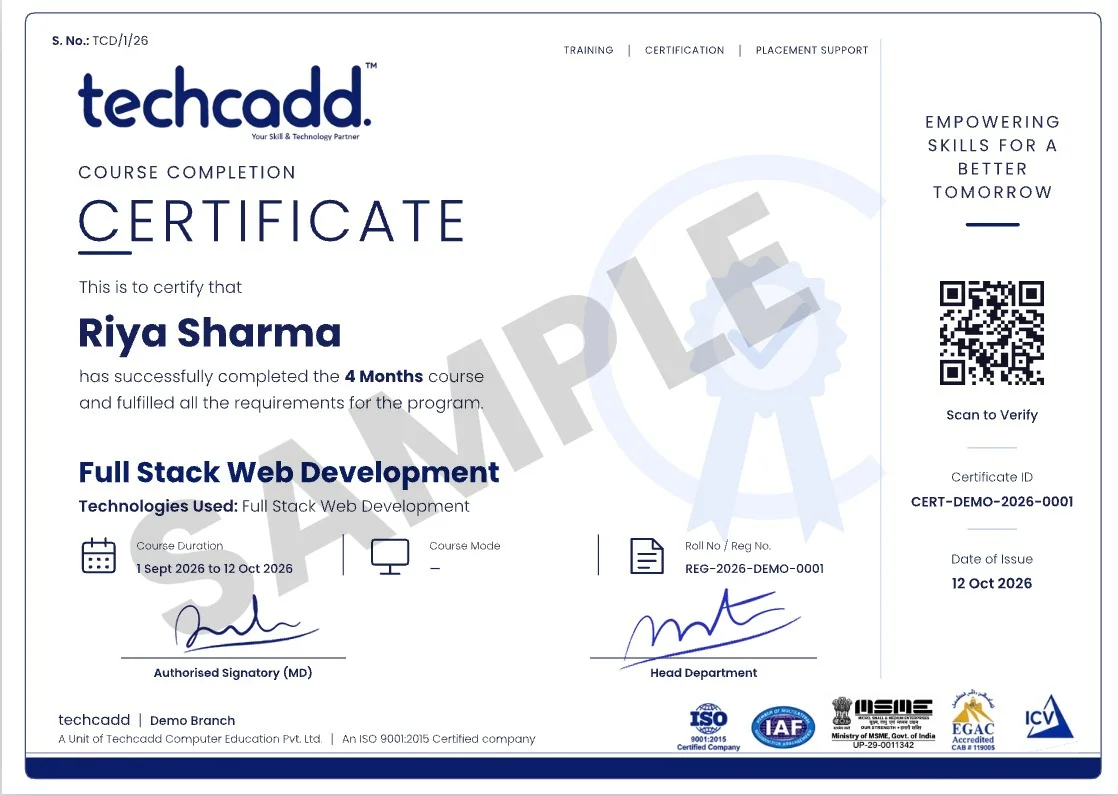
Finish the Practical Computer Learning programme at techcadd Ludhiana and you leave with more than a line on a CV — a verifiable certificate, and the project work that makes it mean something in an interview.
Issued in your name on completion of the Practical Computer Learning syllabus, with a reference number an employer can verify with us.
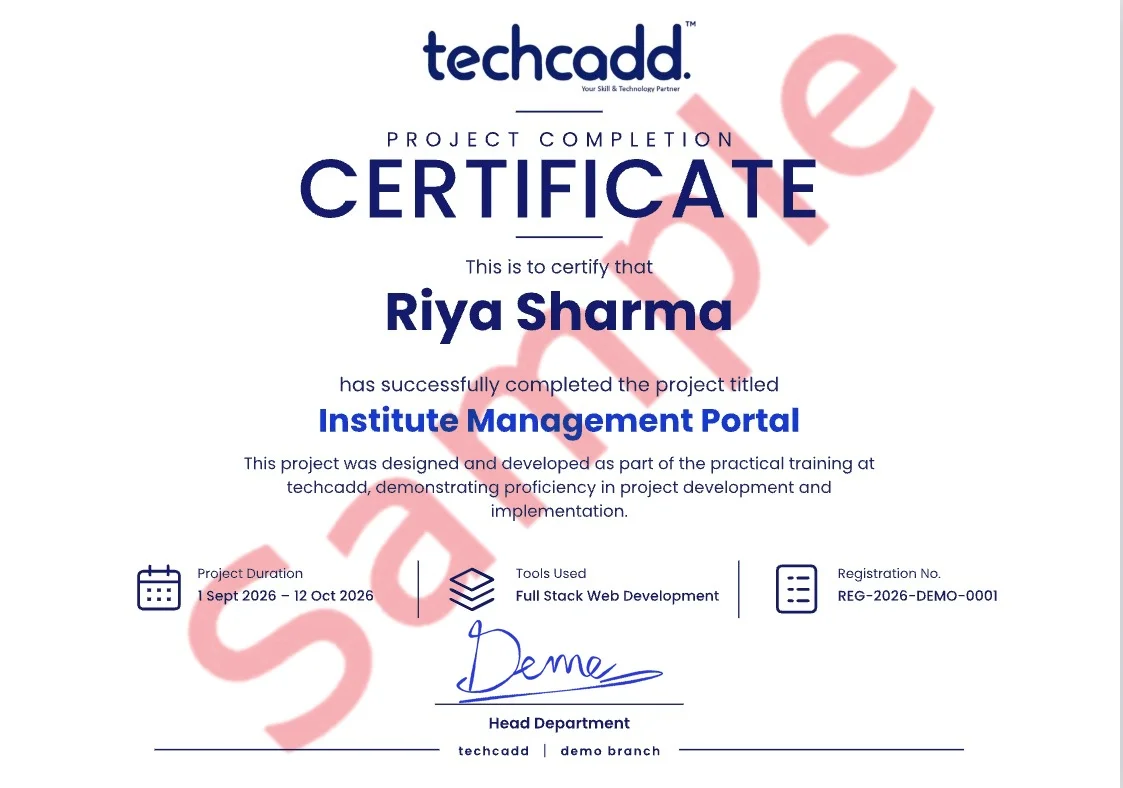
A separate certificate for the capstone you submit, naming the project so the work is attached to the credential.
Students who complete the live-project phase receive an internship letter covering the duration and the work delivered.
Every file, repository and deployed link stays yours — the part of the credential a reviewer can actually open.
techcadd has been training in Ludhiana since 2007. The certificate carries that record; the Practical Computer Learning work you did carries the rest.
Where it takes you
The route from your first module to the roles Practical Computer Learning opens — and the work that has to exist at each step.
Handles everyday computer operations, data entry, document preparation, file management, printing, and basic office tasks.
Enters, updates, organizes, and maintains information using spreadsheets, databases, online forms, and office software.
Supports daily office activities including document preparation, Excel work, email communication, records, and digital file management.
Manages digital records, reports, spreadsheets, documentation, email communication, and routine administrative tasks.
Salary outlook
Indicative ranges for the roles this course opens — what a fresher out of Ludhiana is offered, what the metro and remote markets pay for the same skills, and how that moves with two or three years of work behind you.
| Role | Ludhiana & Punjab | Delhi NCR & Bengaluru | Remote & freelance |
|---|---|---|---|
| Computer Operator | ₹1.5 LPA | ₹3 LP | — |
| Data Entry Operator | ₹1.5 LPA | ₹3 LPA | — |
| Office Assistant | ₹1.8 LPA | ₹3.5 LPA | — |
| Back Office Executive | ₹1.8 LPA | ₹3.5 LPA | — |
Ranges are indicative, drawn from what our own students report and from openings we see through the placement cell. Actual offers depend on your portfolio, the interview and the company — nobody can promise you a number, and we do not.
Computer Operator, Data Entry Operator, Office Assistant, Back Office Executive and related positions, depending on which part of the syllabus you go deepest on.
The first jump usually comes at 18–24 months, once you have shipped work you can point to. Depth in one area moves it faster than breadth across many.
Yes, and a good number of our students do. Remote and contract work is the reason Ludhiana candidates now compete for the same briefs as metro ones — the portfolio travels, the address does not matter.
IT services, manufacturing and export units running automation, e-commerce and D2C brands, healthcare, education, and the agencies serving all of them. Punjab hiring is broader than it looks from a job board.
It helps with the practical half. The projects and tooling carry into an M.Tech, MCA or a specialisation abroad, and the portfolio is often what separates two applicants with the same marks.
Future scope
A course ends; the field does not. Here is the honest version of what the next few years look like for Practical Computer Learning — where the roles go, and what is shifting underneath them while you learn.
Entry roles such as Computer Operator open as soon as you have projects that run. At this stage nobody is asking about your marks — they are asking you to walk through something you built.
The generalists plateau; the specialists do not. Depth in one part of Practical Computer Learning — the part your first job leans on hardest — is what moves you towards data entry operator work.
Architecture, standards, hiring and mentoring. The technical skill is assumed by now; what you are paid for is judgement, and judgement only comes from having shipped things that mattered.
Teams expect Practical Computer Learning work to be done alongside AI tooling. It raises the floor on output and raises the bar on what counts as a junior — which is exactly why the fundamentals in this course are taught the hard way.
What used to be one narrow role now touches data, deployment and the product decision behind it. Every extra layer of Practical Computer Learning you understand is another kind of room you get invited into.
Remote and hybrid hiring means Ludhiana, Jalandhar and Chandigarh candidates now compete for the same roles as Bengaluru ones. Location has stopped being the ceiling it used to be.
Hiring has moved to portfolios, take-home tasks and live problem solving. A certificate opens a shortlist; work that runs is what gets you through the round after it.
Sectors hiring for this skill set
The comparison
Every institute in Ludhiana claims industry training and placement support. These are the differences you can actually check on a demo visit — ask any of them of anyone, including us.
| What to ask about | techcadd | Typical institute |
|---|---|---|
| Who teaches | Trainers who still do Practical Computer Learning work outside the classroom | Full-time faculty teaching from a fixed deck |
| 1-on-1 classes | One-to-one teaching available on every course — the pace is yours, and your work is looked at by name | One group class moving at one pace, whoever that pace happens to suit |
| Project work | 3 real projects plus a capstone you deploy and defend | Guided exercises copied from the board |
| Curriculum | Reviewed every batch against what working teams ship | Updated when the printed syllabus is reprinted |
| How a module ends | A lab task that has to run before you move on | Notes to revise before an exam |
| Doubt support | Trainer sits with your code; open lab hours between classes | Ask at the end of class if there is time left |
| What you leave with | Completion certificate, project certificate, internship letter — all verifiable | One printed certificate |
| After the course | Portfolio review, mock interviews, referrals, continued doubt support | The course ends and so does the contact |
Written about the market, not about any particular institute in it. Visit two or three, sit through a demo class at each, and ask all eight of these questions — that is the only version of this table worth trusting.
Student Voices
Feedback from students who completed the Practical Computer Learning programme at techcadd Ludhiana.
Simranjeet Kaur
Practical Computer Learning / B.Sc. IT graduate
I joined with no background in this. By the third month I was building Practical Computer Learning work on my own, and the project reviews are where I actually learnt to do it properly.
Harman Sethi
Practical Computer Learning / Now working as an intern in the field
The classes are practical. Every session ends with a task that has to work, so you cannot fake understanding. That habit helped me most in interviews.
Ankit Verma
Practical Computer Learning / BCA final year
Doubt support was the difference for me. My trainer sat with my work, found the mistake and made me fix it myself instead of handing over the answer.
Navjot Singh
Practical Computer Learning / Career switch from operations
I came for the skill and left with a portfolio — projects I could actually demo on a call, not a certificate I had to explain.
Simranjeet Kaur
Practical Computer Learning / B.Sc. IT graduate
I joined with no background in this. By the third month I was building Practical Computer Learning work on my own, and the project reviews are where I actually learnt to do it properly.
Harman Sethi
Practical Computer Learning / Now working as an intern in the field
The classes are practical. Every session ends with a task that has to work, so you cannot fake understanding. That habit helped me most in interviews.
Ankit Verma
Practical Computer Learning / BCA final year
Doubt support was the difference for me. My trainer sat with my work, found the mistake and made me fix it myself instead of handing over the answer.
Navjot Singh
Practical Computer Learning / Career switch from operations
I came for the skill and left with a portfolio — projects I could actually demo on a call, not a certificate I had to explain.
Simranjeet Kaur
Practical Computer Learning / B.Sc. IT graduate
I joined with no background in this. By the third month I was building Practical Computer Learning work on my own, and the project reviews are where I actually learnt to do it properly.
Harman Sethi
Practical Computer Learning / Now working as an intern in the field
The classes are practical. Every session ends with a task that has to work, so you cannot fake understanding. That habit helped me most in interviews.
Ankit Verma
Practical Computer Learning / BCA final year
Doubt support was the difference for me. My trainer sat with my work, found the mistake and made me fix it myself instead of handing over the answer.
Navjot Singh
Practical Computer Learning / Career switch from operations
I came for the skill and left with a portfolio — projects I could actually demo on a call, not a certificate I had to explain.
Real, unedited feedback from techcadd learners on Google.
Frequently asked questions
The 7 things people ask most often about the Practical Computer Learning course at techcadd Ludhiana.
The complete Practical Computer Learning programme runs for Flexible batches depending on the batch you choose. Weekday, weekend and fast-track options are available, along with shorter modules for students who only need the fundamentals.
School students after 12th, college students from any stream, graduates and working professionals changing track. The first module assumes no prior experience.
No. The course starts from the basics. If you already have some background, your trainer will move you faster through the first module so you reach the project work sooner.
Microsoft Word, Microsoft Excel, Microsoft PowerPoint, Windows, Google Docs, Google Drive and Gmail — plus the day-to-day tooling and workflow that surrounds them in a real team.
Yes. Each module closes with a lab project, and the course ends with a capstone you can put on your portfolio and defend in an interview.
Placement support includes resume and portfolio review, aptitude and role-specific practice, mock interviews and interview referrals through our hiring network.
Yes. You receive a techcadd Practical Computer Learning completion certificate, and a separate project certificate for the capstone you submit.
Next batch
Send this form and a counsellor calls you back about this course specifically — batch dates, fees and whether it fits what you already know.
Would rather talk now? +91 98881 22667
Ready to get started?
Talk to a counsellor today. One call is usually enough to know which track fits your degree, your schedule and the job you want.
Call now+91 98881 22667